FastPlaz Template Engine
FTE (FastPlaz Template Engine) is a simple template engine written in Pascal for use with FastPlaz. FTE dynamically separates business logic (Pascal code) from presentation logic (view) by allowing special tags to be placed inside an HTML document.
FTE can also cache and apply simple compression to HTML documents.
Because FTE separates business logic from presentation logic, it is easier to split roles between the Developer and the UI Engineer. The UI Engineer can do their work without being directly involved in writing the business logic (Pascal), and vice versa.
Theme
FTE lets developers freely create various themes for their applications. FTE recommends the following directory and file structure.
├── public_html
│   ├── config
│   ├── files
│   │   └── images
│   ├── modules
│   │   ├── contacts    👈 presenter/view for the Contact module
│   │   └── employees   👈 presenter/view for the Employee module
│   ├── themes
|   |   ├── ThemeCantik 👈 ThemeCantik theme
|   |   ├── Dashboard   👈 Dashboard theme
│   │   └── simple      👈 Simple theme
│   │       ├── assets
│   │       ├── plugins
│   │       └── templates
│   └── ztemp
The default theme is selected in the config.json configuration file.
{
  "systems" : {

    "theme_enable" : true,
    "theme" : "Dashboard",  👈 select the theme here

  }
}
Example of the HTML master layout in the Basic theme.
<!DOCTYPE html>
<html>
[include file="includes/head"]
<body id="page-top">
    [include file="includes/navigation"]
    <div id="main">
        <div class="container">
            <h3>[$Title filter=ucwords]</h3>
        </div>
        [maincontent]
    </div>
    [include file="includes/footer"]
</body>
</html>
It looks very simple thanks to Tagging.
You can study the details from the example files available in the repository.
Tag
FTE can process HTML using specific Tag codes.
Construct Tags
Some of the constructs available in FTE
| Tag | Description |
|---|---|
| include | Inserts an .html file into the html document[include file="includes/head"] |
| foreach | Loop for displaying data from a table, array or json |
| if | Conditional |
| filter | Applies a filter to a variable. Currently available: nl2br, uppercase, lowercase, ucwords, moreless, dateformathuman, permalink, multifilter. example: [$FullName filter=uppercase] |
| assign | Assigns a value to a variable |
| assignto | Assigns the value of a table field to a variable |
| block | block controller |
Special Tags
With several special [tags] such as:
| Tag | Description |
|---|---|
| title | Displays the sitename from config.json |
| slogan | Displays the slogan from config.json |
| baseurl | Displays the baseurl from config.json |
| thisurl | Current active URL |
| theme | Name of the current theme |
| themepath | Path of the current theme |
| themefullpath | Full path, including the BaseURL, of the current theme.<link rel="stylesheet" href="[themefullpath]/styles/style.css"> |
| datetime | Displays the date and time, with the default format 'dd MMM YYYY HH:nn:ss'. Use the 'format' parameter to control the output. Example: [date format="yyyy/dd"] |
| time | Displays the time |
| date | Displays the date, with the default format 'dd MMM YYYY'. Use the 'format' parameter to control the output. Example: [date format="yyyy/dd"] |
| env | Gets the value of an environment variable, e.g.: [env key="HTTP_REFERER"] |
| loadtime | Displays the application processing time in milliseconds |
| flashmessages | Displays Flash Messages, can be used to store error messages |
| maincontent | Location where each module's main content is displayed |
Featured Tag
And several featured tags:
| Tag | Description |
|---|---|
| recaptcha | Displays ReCaptcha to better secure your forms.[recaptcha key="your_public_key"] |
| csrf-token | CSRF Token as a simple measure to secure forms.[csrf-token name="optionalModuleName"] |
| gt | GetText, Multi language support.[gt text="Welcome"] |
Usage Examples
More complete examples of using these tags can be found in the provided examples, especially in the output generated by the Full Package Application wizard.
include
include inserts an .html file into the document. The file location is relative to the directory of the theme currently in use.
If the Dashboard theme is in use and the tag [include file="includes/head"] is found, the file will resolve to themes/Dashboard/templates/includes/head.html.
<!DOCTYPE html>
<html>
[include file="includes/head"]
<body id="page-top">
    [include file="includes/navigation"]
    <div id="main">
        <div class="container">
            <h3>[$Title filter=ucwords]</h3>
        </div>
        [maincontent]
    </div>
    [include file="includes/footer"]
</body>
</html>
foreach
foreach is a loop used to display the contents of data of type table, array or json.
foreach usage format
[foreach from=$VariableName item=row type=table]

  html content: [row.nama_field]

[/foreach from=$VariableName]
$VariableName is defined in your controller code.
ThemeUtil.AssignVar['$VariableName'] := @Model.Data;
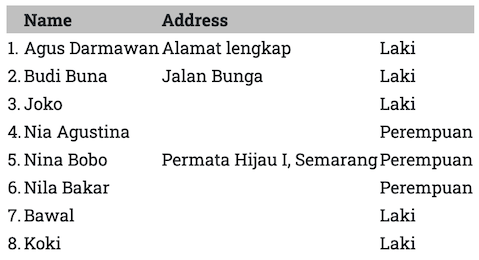
The following HTML code also shows how to use if inside a foreach block.
<table>
<thead>
<tr><th> </th><th>Name</th><th>Address</th><th></th></tr>
</thead>
<tbody>
[foreach from=$Contacts item=aItem type=table]
  [aItem.sex assignto=$JK]
  <tr><td>[$index].</td><td>[aItem.first_name] [aItem.last_name]</td><td>[aItem.address]</td><td>[if $JK eq "0"]Laki[else]Perempuan[/if]</td></tr>
[/foreach from=$Contacts]
</tbody>
</table>
Result:
assignto
assignto assigns the value of a table field to a variable. This is usually useful when you need a condition on that field.
If the contacts table has a sex field containing 0 or 1, meaning male or female, the html code would look like this:
[foreach from=$Contacts item=aItem type=table]
[aItem.sex assignto=$JK]
<tr><td>[$index].</td><td>[aItem.first_name] [aItem.last_name]</td><td>[aItem.address]</td><td>[if $JK eq "0"]Laki[else]Perempuan[/if]</td></tr>
[/foreach from=$Contacts]
//TODO: Assign