Architecture
The basic concept of the FastPlaz architecture is actually very simple: separate the routines that execute, the ones that process data, and the ones that present it. This is commonly known as MVC (Model-View-Controller).
This concept is very common in web and mobile application frameworks. Many web application frameworks (including PHP, Django, Ruby on Rails, etc.) use MVC as their software architecture.
MVC
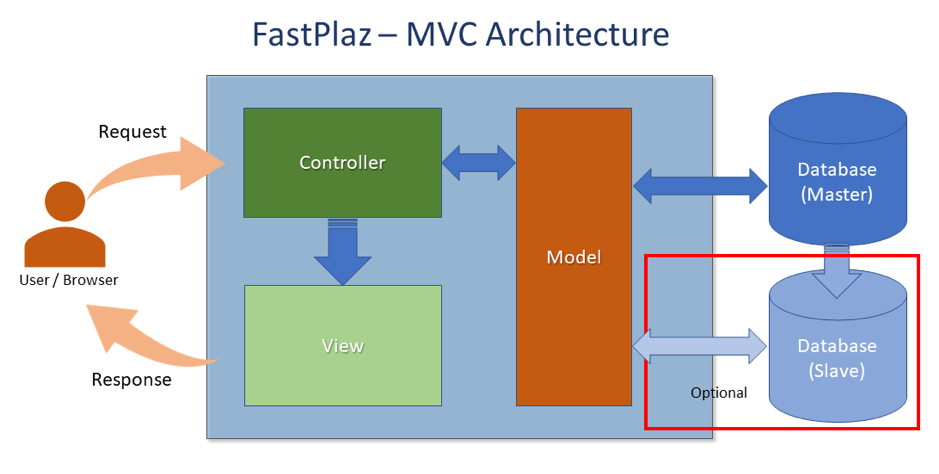
Model
Defines the data for the application (usually stored in a database server).
View
Produces the interaction visible to the user (usually a web page). The View component presents information to the user and sends actions to the Controller for data manipulation.
Controller
Basically, the interface between the View and the Model. It processes actions given by the user, processes data from the database, and sends the result to the View to be shown on the user's screen.
One of the main advantages of the MVC architecture is the abstraction between these three components.
Files and Directories
Structure
By default, a project created with FastPlaz has the following directory structure:
├── docs
├── public_html
│   ├── config
│   ├── files
│   │   └── images
│   ├── modules
│   │   ├── contacts
│   │   └── employees
│   ├── themes
│   │   └── simple
│   │       ├── assets
│   │       ├── plugins
│   │       └── templates
│   └── ztemp
└── source
    ├── api
    │   ├── controllers
    │   └── routes
    ├── app
    │   ├── controllers
    │   └── routes
    ├── common
    │   ├── controllers
    │   └── models
    └── sql
All Pascal source can be placed in the source directory. It is recommended to group the files by function. Each project usually needs at least the controller, route, and model directories.
The contents of the public_html folder are the files you can publish/upload to the target server.
Configuration
The configuration file is config/config.json, with the following structure:
{
  "systems" : {
    "sitename" : "FastPlaz Example",
    "slogan" : "FastPlaz App Example",
    "baseurl" : "",
    "admin_email" : "webmaster@coba.com",
    "development" : true,
    "debug" : true,
    "module_default" : "main",
    "language_default" : "id",
    "theme_enable" : true,
    "theme" : "Dashboard",
    "cache" : "none",
    "temp" : "ztemp",
    "error_url" : "\/",
    "session_timeout" : 0,
    "error_redirect" : false
  },
  "database" : {
    "default" : {
      "driver" : "MySQL 5.7",
      "hostname" : "localhost",
      "port" : "",
      "username" : "your_username",
      "password" : "your_password",
      "database_name" : "the_database_name",
      "charset" : "",
      "prefix" : "",
      "version_check": false,
      "library" : ""
    }
  },
  "mailer" : {
    "default" : {
      "hostname" : "your.smtp.server",
      "username" : "your_username",
      "password" : "the_password",
      "smtp_port" : "465",
      "ssl" : true,
      "tls" : true
    }
  }
}
Notes:
session_timeoutis measured in minutes. See Upgrading to the 2026 Release.- To run the application as a standalone HTTP server (port,
max_requests, database connection,trust_proxy), add asystems/serversection. See Standalone HTTP & CGI.