ORM (Object Relationship Mapping)
Object Relationship Mapping is a programming technique for using a relational database as data storage in the form of objects. It is commonly used in object-oriented programming languages that need a relational database for storage.
FastPlaz provides a Simple ORM for this, especially for simple CRUD use.
The supported databases are the ones supported by Free Pascal:
- Firebird
- MySQL
- ODBC
- Oracle
- PostgreSQL
- SQLite3
The database is selected through the configuration in config.json.
Model
The first step in connecting an application to a database is to create a Model.
Suppose there is a table named contacts; the FastPlaz model source code would look like this.
 TContactModel = class(TSimpleModel)
 private
 public
   constructor Create(const DefaultTableName: string = '');
 end;

.
.
.

constructor TContactModel.Create(const DefaultTableName: string = '');
begin
  inherited Create( DefaultTableName); // table name = contacts
  //inherited Create('yourtablename'); // if use custom tablename
end;
Default Table Name
FastPlaz models use Plural Methods. This means:
- TContactModel 👉 table name: contacts
- TBuildingModel 👉 table name: buildings
- TWarehouseModel 👉 table name: warehouses
So TKaryawanModel will refer to the table karyawans? Yes, that's right. Looks odd? Don't worry, there is a feature for customizing the name.
Default Primary Key
The default primary key is the first letter of the table name followed by the string 'id'.
So if the model name is TContactModel, then:
- Table name: contacts
- Primary key: cid
Custom Naming
You can change the default table name and primaryKey to suit your needs.
constructor TKaryawanModel.Create(const DefaultTableName: string = '');
begin
  inherited Create( DefaultTableName);
  TableName := 'karyawan'; // define the table name here
  primaryKey := 'id';
end;
CRUD
As with any application connected to a database, you will inevitably deal with CRUD (Create Read Update Delete).
Create
To create new data, call the New procedure, then assign values to the fields, using the format:
contact['field_name'] := 'value';
So it looks like this:
// create new data

contact := TContactModel.Create();
contact.New;
contact['field_name'] := 'value';
contact['first_name'] := 'Luri';
contact['last_name'] := 'Luri';
contact['address'] := 'Alamat Lengkap Saya';
contact['status_id'] := 0;
if not contact.Save() then
begin
  //
  // failed to save the data
  //
end;
contact.Free;
Read
A field value can be read using the following format:
variableName := contact['field_name'];
Available functions/methods:
- All, gets all rows
- Find(...), gets data matching certain conditions
- FindFirst(...), gets the first row matching certain conditions.
// get all rows
contact := TContactModel.Create();
if contact.All then
begin
  //
  // data found
  //
end;
// find data where primaryKey field = 2
if contact.Find(2) then
begin

  // data found
  firstName := contact['first_name'];

end;
// find data with conditions
var
  whereAsArray: TStringArray;

.
.
whereAsArray.Add('first_name="luri"');
if contact.Find(whereAsArray) then
begin
  //
  // data found
  //
end;
// find data with conditions, order and limit
// order by name
// limit 10 offset 90
var
  fieldList: string;
  whereAsArray: TStringArray;

.
.
whereAsArray.Add('first_name="luri"');
fieldList := 'cid, name, address, status';
if contact.Find(whereAsArray, 'name', 10, fieldList, 90) then
begin
  //
  // data found
  //
end;
Join Table
Joining other tables is easy too. Add the following code before the find call.
contact.AddJoin('reference_table', 'reference_field', 'join_field',
  ['field_name1','field_name2 alias_name']);
A complete example looks like this:
// condition & join

whereAsArray.Add('first_name="luri”');

contact.AddJoin('locations', 'id', 'contacts.location_id',
  ['code','name country']);

if contact.Find(whereAsArray) then
begin
  //
  // data found
  //
end;
Update
Updating data is similar to Create. Start by finding the data, then change it as in the following code:
// find and update
// find the contact with primary key = 6

if contact.Find(6) then
begin
  s := contact['first_name'];

  contact['first_name'] := 'Budi';// change the name to "Budi"
  if contact.Update() then
  begin

    // update succeeded

  end;

end;
Delete
// delete with index

if contact.Delete(6) then
begin
  //
end;
// delete with condition
var
  whereAsArray: TStringArray;

.
.

whereAsArray.Add('status_id=1');
if contact.Delete(whereAsArray) then
begin
  //
end;
// delete with Find function
var
  whereAsArray: TStringArray;

.
.

whereAsArray.Add('status_id=1');
if contact.FindFirst(whereAsArray) then
begin
  // do something

  Delete();
end;
Query Builder
One of the nice things about the FastPlaz Simple ORM is its Query Builder. The Query Builder generates an SQL (MySQL) statement, which is then executed.
// query builder

contact := TContactModel.Create();
if contact.Select('first_name')
  .Where('status_id=0')
  .OrderBy('first_name')
  .Limit(10)
  .Open() then
begin

  //

end;
Behind the scenes, this code generates the following SQL Query:
SELECT first_name
FROM contacts
WHERE status_id=0
ORDER BY first_name
LIMIT 10
Processing Data
The sections above show how to write and read a single row of data. What if you need to process data containing multiple records? You can use Pascal's loop constructs, such as for...do, repeat...until or while...do.
for i := 1 to contact.RecordCount do
begin
  firstName := contact['first_name'];

  // your code here

  contact.Next; // move to the next record
end;
repeat
  firstName := contact['first_name'];

  // your code here

  contact.Next; // move to the next record
until warehouses.EOF;
while not contact.EOF do
begin
  firstName := contact['first_name'];

  // your code here

  contact.Next; // move to the next record
end;
The code above is useful when you process data inside a controller.
Displaying Data
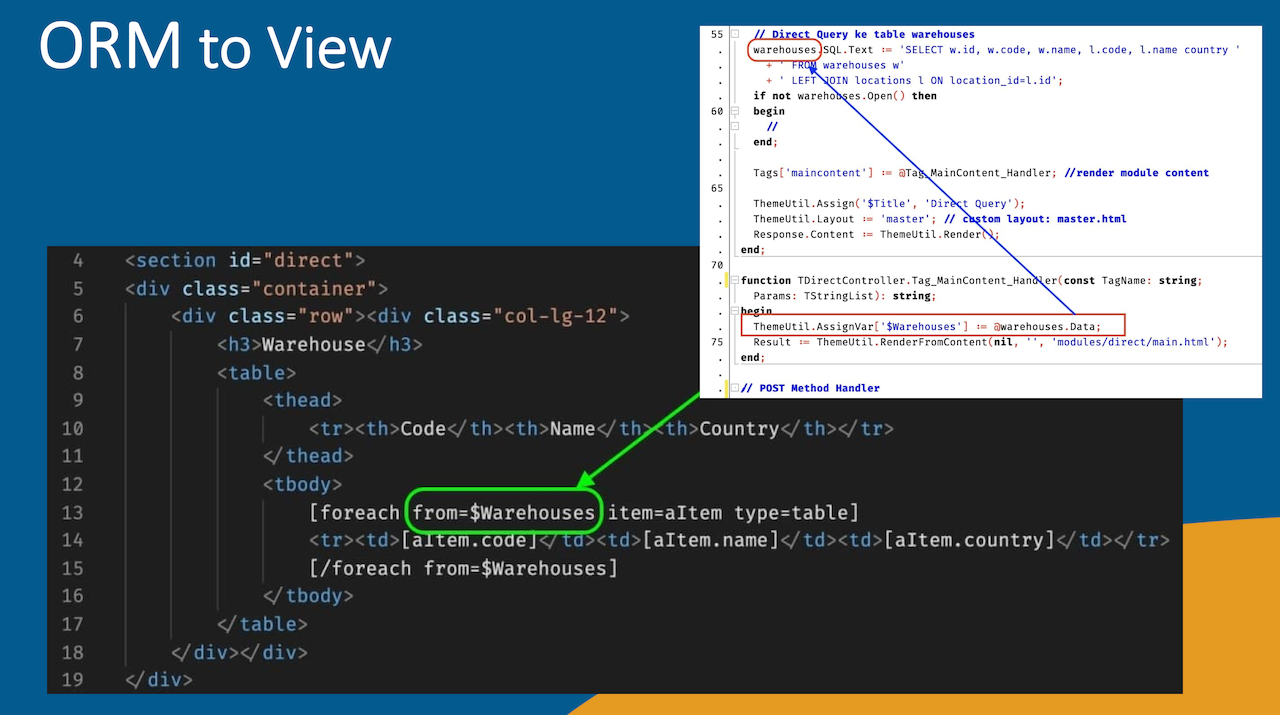
Processing Data is not always necessary if you only want to display the data to the user. With FTE/FastPlaz Template Engine, you only need to define the data variable to be sent to the view.
For example, if an application needs to display the contents of the warehouses table, you would do the following:
Write Pascal code to access the warehouse model
// code in the warehouse controller
// the following line is defined in the Create procedure
//   warehouses := TWarehouseModel.Create();

procedure TWarehouseController.Get;
var
  whereAsArray: TStringArray;
begin
  DataBaseInit(); // initialize the database connection

  warehouses.AddJoin('locations', 'id',
    'warehouses.location_id',
    ['code','name country']);
  if not warehouses.Find(whereAsArray) then
  begin
    //
  end;

  // Assign the warehouses data to the $Warehouses variable
  //   for use in the view
  ThemeUtil.AssignVar['$Warehouses'] := @warehouses.Data;

  Tags['maincontent'] := @Tag_MainContent_Handler; //<<-- tag maincontent handler
  ThemeUtil.Assign('$Title', 'DB Model');
  ThemeUtil.Layout := 'master'; // custom layout: master.html
  Response.Content := ThemeUtil.Render();
end;
HTML code in the view
The HTML code in the view is as simple as this:
<table>
<thead>
<tr><th> </th><th>Code</th><th>Name</th><th>Country</th></tr>
</thead>
<tbody>
[foreach from=$Warehouses item=aItem type=table]
<tr><td>[$index].</td><td>[aItem.code]</td><td>[aItem.name]</td><td>[aItem.country]</td></tr>
[/foreach from=$Warehouses]
</tbody>
</table>
Information about the foreach tag can be found in the FTE section.
The result will look roughly like this
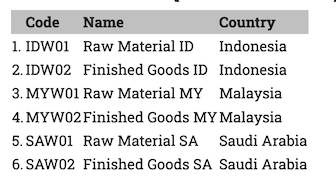
This is a simple example using only "<table>..</table>". For a nicer presentation, you can use Ajax with existing JS/CSS libraries.
A more complex example can be found in the source code of the Database-Example repository.
More about templating can be found in the FastPlaz Templating Engine section.
Illustration