Database Explorer
The Database Explorer utility is very handy for those who don't want to keep switching windows from the IDE/Editor to a DB browser, back to the editor, and then back again.
The Database Explorer utility is very useful for managing databases. It covers simple needs such as select, viewing tables, and so on.
Following the SQLdb support in free-pascal, Database Explorer supports connections to these databases: MySQL, Firebird, ODBC, Oracle, PostgreSQL, SQLite3.
Features
Copy fields name to source editor
A common problem for developers is forgetting which fields a table has, and having to switch back and forth between a database explorer application (e.g. phpmyadmin) and Lazarus to retype the table's field names into the source code.
Well... this tool makes that easy. Right-click a table name in the list, and this menu will appear.
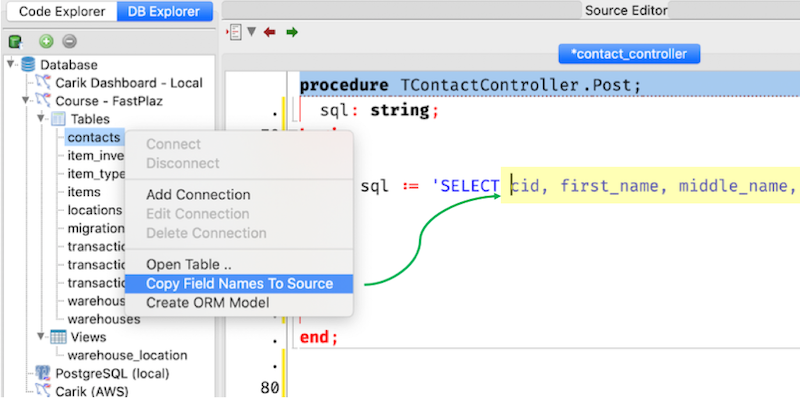
The table's field names will then be written into the source code editor, and are also available on the clipboard.
Auto generate model
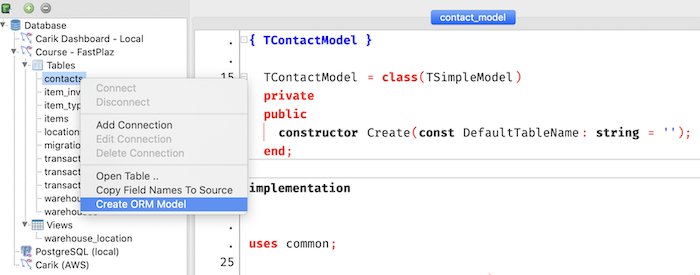
Besides the FastPlaz main menu, creating a model can also be done from Database Explorer. Just right-click a table name, then choose the Create ORM Table menu.