Installation
Prerequisite
- FPC / Free Pascal Compiler, version 3.2.2
- Lazarus (optional; applications can also be compiled from the terminal)
- Git Client
- Web Server (Apache), optional. Since the 2026 release, applications can run as a standalone HTTP server
- Database Server (MySQL, PostgreSQL, SQLite, or Firebird), if the application uses a database
Preparation
Download / Clone
First, download or clone this repository.
$ git clone -b development https://github.com/fastplaz/fastplaz.git
Cloning is recommended over a manual download. When there are updates or changes later, you only need to pull.
$ git reset --hard HEAD
$ git pull
This way only the changes are fetched, without re-downloading all the files. After that, just recompile the package files.
Installation
If you are a Lazarus user, installing FastPlaz for basic use is very easy. Just follow these steps:
- Install
jcfbaseandjcfidelazarus(Jedi Code Format) from the Online Package Manager. - Open
tools/fastplaz_runtime.lpk, then compile it. - Open
tools/fastplaz_tools.lpk, then compile and install it. Lazarus will be rebuilt.
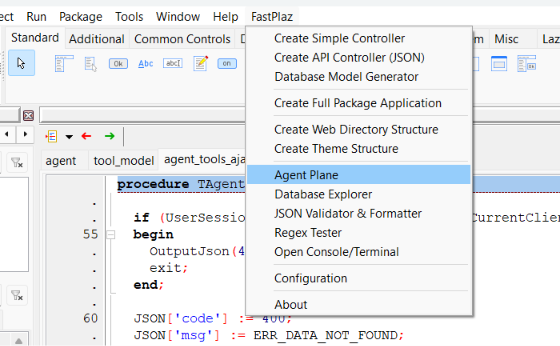
As a result, a FastPlaz menu like this will appear, including AI Agent Plane, Database Explorer, and other tools.
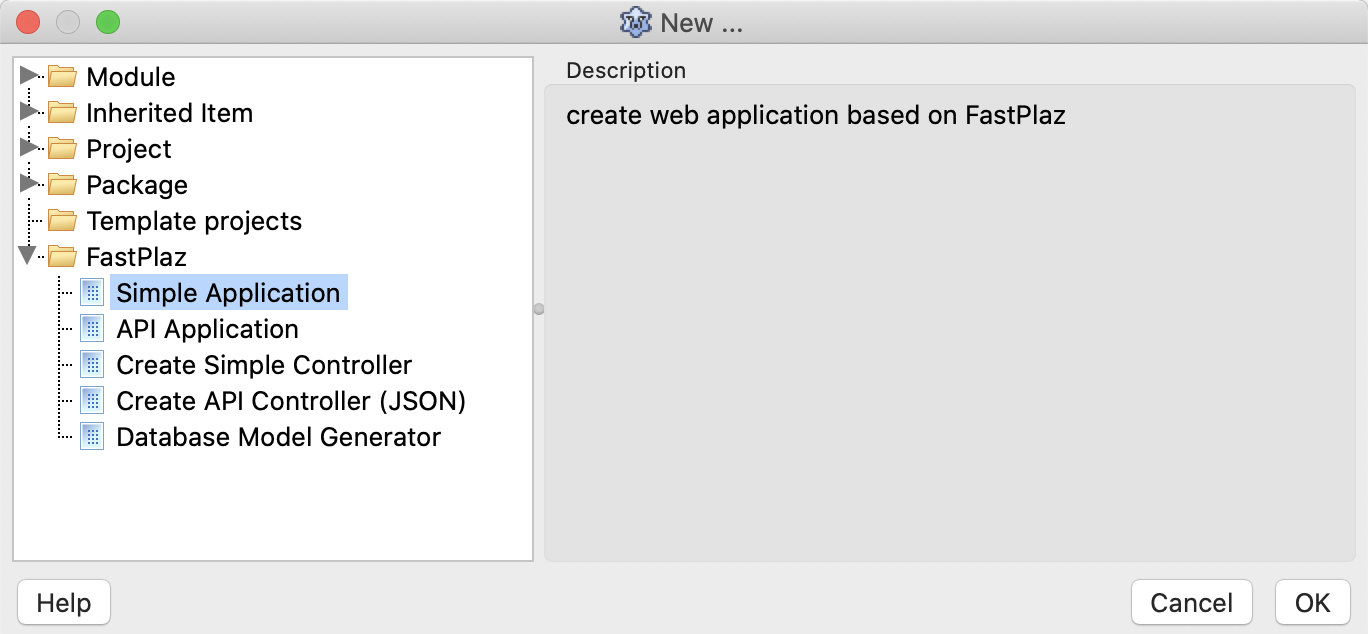
And new options will appear in the File|New Project ... menu, like this
Running Your First Project
- Select File → New Project ... → Simple Application (or API Application).
- Select the HTTP Run Mode.
- Run the project (Run → Run or F9), then open http://127.0.0.1:17845.
The same binary can also run as CGI when executed by Apache. See Standalone HTTP & CGI.
Web Server Configuration
This section is for running the application as CGI under Apache, for example on shared hosting. For standalone mode behind nginx/Apache, see Standalone HTTP & CGI.
CGI and mod_rewrite
In CGI mode, FastPlaz uses the CGI protocol to run, which means the web server must have CGI enabled. Don't worry, most Apache web server distributions already have CGI enabled.
For more power, FastPlaz strongly recommends enabling Rewrite in Apache. To enable mod_rewrite, just remove the comment mark in the httpd.conf file.
#LoadModule request_module modules/mod_request.so
#LoadModule reqtimeout_module modules/mod_reqtimeout.so
LoadModule rewrite_module modules/mod_rewrite.so
#LoadModule sed_module modules/mod_sed.so
#LoadModule session_module modules/mod_session.so
Virtual Host
CGI can be enabled by changing the virtual host configuration. An example looks roughly like this:
<VirtualHost *:80>
    ServerName course.fastplaz.com
    DocumentRoot "D:\course\fastplaz\public_html"
    ErrorLog "logs/course.fastplaz.com-error.log"
    CustomLog "logs/course.fastplaz.com-access.log" common

    <Directory "D:\course\fastplaz\public_html">
        Options +ExecCGI +Indexes
        AddHandler cgi-script .cgi
        AddHandler cgi-script .bin
        AddHandler cgi-script .exe
        Require all granted
        AllowOverride All
    </Directory>
</VirtualHost>
Add Options +ExecCGI and AddHandler as shown above. The same applies to Apache users on Linux or Mac; only the Directory and DocumentRoot path names differ.