Model
Naming
Before reading this page, make sure you have studied the model naming convention in FastPlaz.
tabel      : employees
file model : employee_model.pas
Creating a Model
A model can be created in 2 ways:
- From the
File|New ...|Database Model Generatormenu - From the
FastPlaz|Database Model Generatormenu
In this dialog
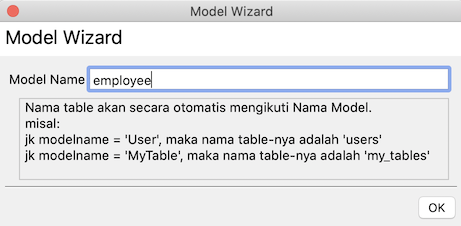 enter the name of the model to create. Pay attention to the model naming convention and how it relates to the primary key.
A file employee_model.pas will then be created, roughly like this.
unit employee_model;

{$mode objfpc}{$H+}

interface

uses
  Classes, SysUtils, fpjson, database_lib, string_helpers, dateutils,
  datetime_helpers, array_helpers;

type

{ TEmployeeModel }

  TEmployeeModel = class(TSimpleModel)
  private
  public
    constructor Create(const DefaultTableName: string = '');
  end;

implementation


uses common;

constructor TEmployeeModel.Create(const DefaultTableName: string = '');
begin
  inherited Create( DefaultTableName); // table name = employees
  //inherited Create('yourtablename'); // if use custom tablename
end;

end.
If your table name and primary key are different, define them as described in the custom ORM convention.
constructor TEmployeeModel.Create(const DefaultTableName: string = '');
begin
  inherited Create( DefaultTableName);
  TableName := 'karyawan'; // define the table name here
  primaryKey := 'id';
end;